Define the reporting period, currency and scope
Identify the church, the first and last date of the period, and the currency. If the report covers only a ministry or a building project, say so in the heading rather than presenting it as the whole church.
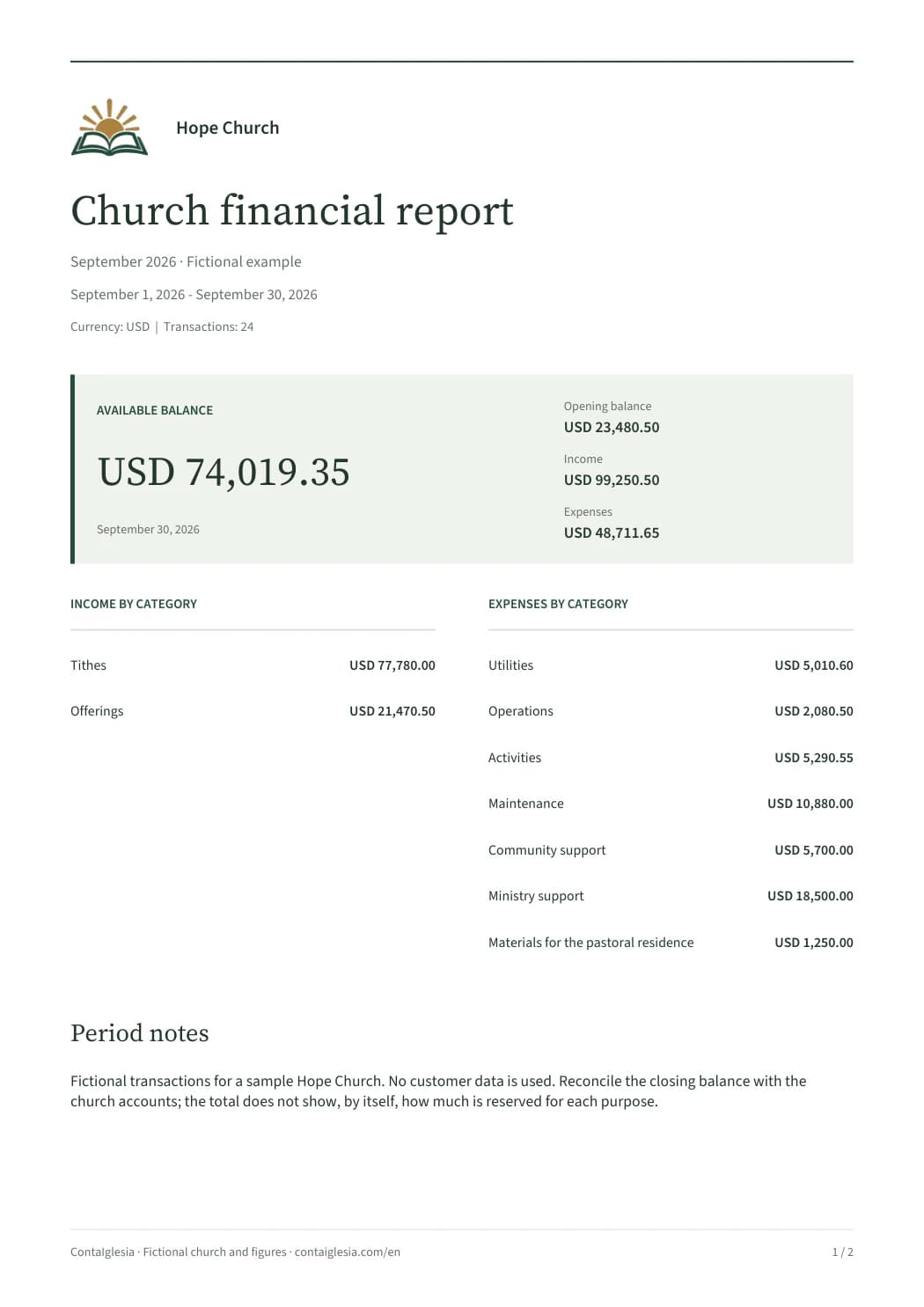
The sample covers September 2026 in USD. Its figures are demonstration data, not a suggested church budget. Do not combine balances from different months or currencies into one closing figure.
Before preparing the document, check the transaction dates, opening balances and unresolved items. A well-presented PDF cannot correct a duplicate entry or supply a receipt that has not been reviewed.
Distinguish the period result from the closing balance
The sample starts with $23,480.50. The church receives $99,250.50 and records $48,711.65 in expenses. The difference for the period is $50,538.85; the closing balance is $74,019.35.
These last two amounts answer different questions. The period result compares income and expenses. The closing balance also includes the money recorded at the start.
Moving cash into a bank account of the same church changes where the money is held. If the offering was already recorded when received, that deposit is not another offering. Preserve the connection when reconciling the accounts.
Scroll the table to see every column.
| Figure | Amount | What it explains |
|---|---|---|
| Opening balance | $23,480.50 | Money recorded at the start |
| Income | $99,250.50 | Receipts included in the period |
| Expenses | $48,711.65 | Payments within the same scope |
| Period result | $50,538.85 | Income minus expenses |
| Closing balance | $74,019.35 | Opening balance plus the period result |
Reconcile the closing balance with the church accounts. It does not, by itself, show how much is reserved for each purpose.
Use categories that help explain the period
The sample separates tithes and offerings. Its expense categories include utilities, operations, activities, maintenance and ministry support. Consistent names make a comparison useful; changing the label for the same type of expense each month fragments the picture.
One transaction records $1,250.00 of materials for the pastoral residence, with reference FAC-24891. The reference connects a category total to a specific record and its supporting document.
If money is set aside for missions or construction, keep that purpose visible in the underlying records. A bank balance can include several destinations. The category summary in this example is not a separate fund-balance report and does not make the entire balance available for general spending.
Keep the transaction detail that supports the totals
The second page contains 24 transactions with dates, types, references, descriptions and amounts. It gives a reviewer a route from the summary to the underlying records without rebuilding the month from messages and loose receipts.
Use descriptions that explain the payment: electricity, cleaning supplies or Bible teaching materials are more useful than a generic payment label. Keep the purchase or project reference when it helps someone locate the supporting document.
A report shared widely does not need to publish every receipt image or the personal contribution history of each member. Keep access to individual records and sensitive documents limited to the people who need them.
Explain unresolved items and record the review
A short note should identify an item that needs attention: a deposit not yet reflected by the bank, a missing receipt, an advance awaiting supporting documents, or a cash difference. Record the issue and the next action rather than hiding the difference in another category.
When the bank and the records disagree, compare both sides before changing an amount. Some differences are timing items; others need a transaction that was genuinely omitted. An unexplained adjustment does not provide the missing evidence.
Record who prepared and reviewed the report according to the church procedure, along with the version shared. Check any signature or date fields before printing. If a figure changes after delivery, identify the correction and preserve the earlier version.
Choose between manual records and a generated report
The PDF here is a completed example for reviewing the structure. It is not an editable spreadsheet or a blank statement form. For manual bookkeeping, start with the linked income-and-expense spreadsheet and adapt its categories to your church.
ContaIglesia prepares reports from recorded transactions. You choose the period and can include detail, notes and the church identity. Review the output before sharing it, especially when the closing records have changed.
When evaluating the system, begin with a few demonstration transactions and keep the usual records. Check the date range, currency, receipt and another team member’s access before moving a full history.
This example supports internal reporting. It is not a complete set of financial statements, a tax filing or a substitute for any documents a qualified professional needs to prepare for the church.
Frequently asked questions
Can I open the PDF without creating an account?
Yes. The complete two-page example can be viewed before downloading, without an account. It contains fictional church data.
Is this an editable church finance spreadsheet?
No. The PDF is a completed example. For manual records, use the income-and-expense spreadsheet linked in the resources. In ContaIglesia, the report is generated from the church transactions.
Is the closing balance the same as the result for the month?
No. The period result is income minus expenses. The closing balance also includes the opening balance.
Does the report need to list each donor?
Not to explain the category totals and closing balance. Individual contribution histories should have access limited to authorized people.