

Church accounting software

The church’s accounts, with the detail behind them.

Know what came in, what was spent and which records support the balance. Keep transactions and receipts together, then prepare a financial report your church can review.

View pricing

14 days · No card · No charge at signup

See an example

A CONTAIGLESIA FINANCIAL REPORTUSD
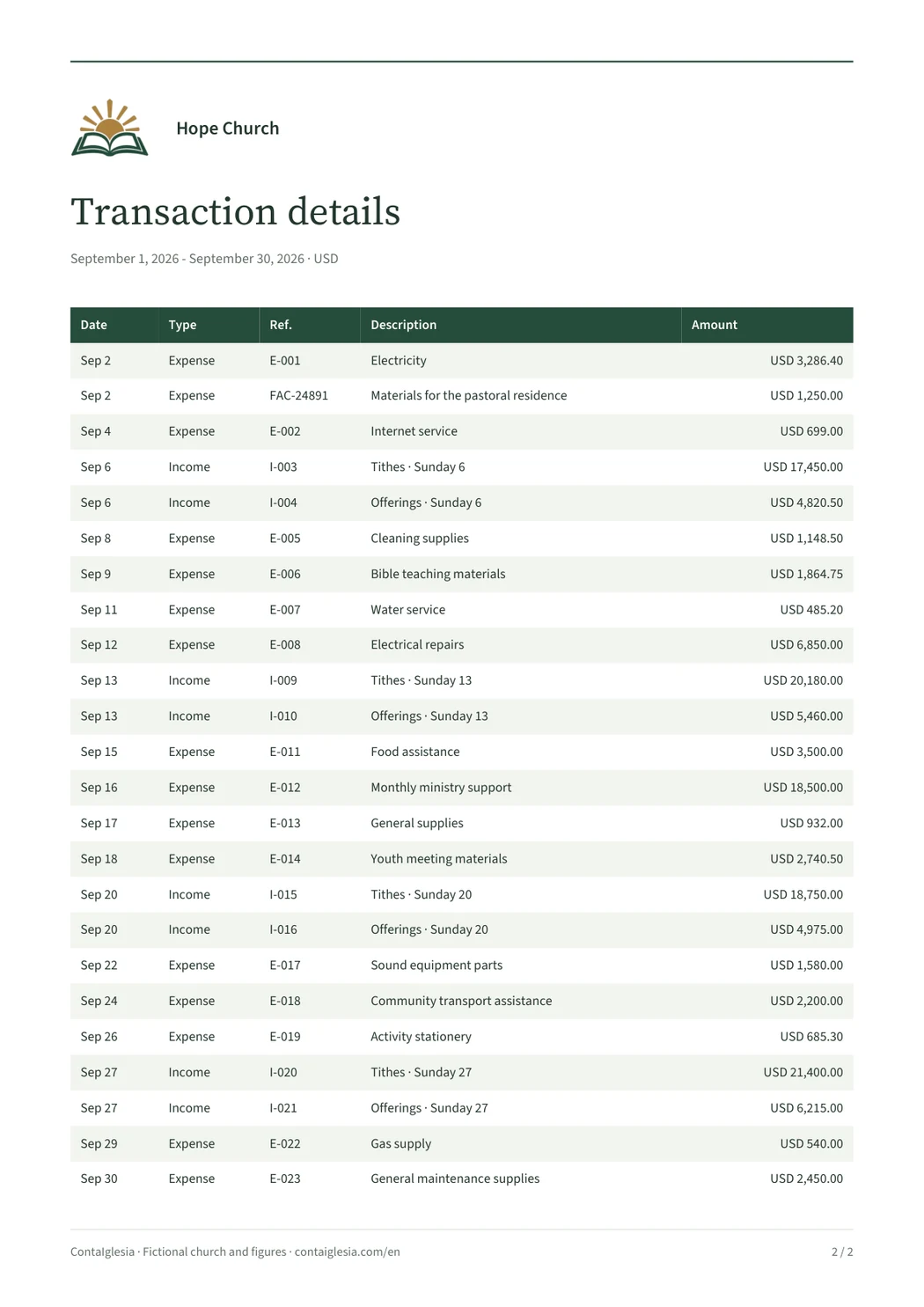
24 fictional transactions with dates, descriptions, references and amounts in USDExpandView the complete report

Fictional church and amounts · September 2026
Document generated with ContaIglesia.

Built for your church
Pastors, treasurers and church finance teams that need clear records without a complex ERP.

In practice

Try it with a real part of the church’s work.

Record income, an expense and their supporting documents. Prepare a report for the same period and check whether it gives your team the detail it needs.

One transaction, with its supporting records

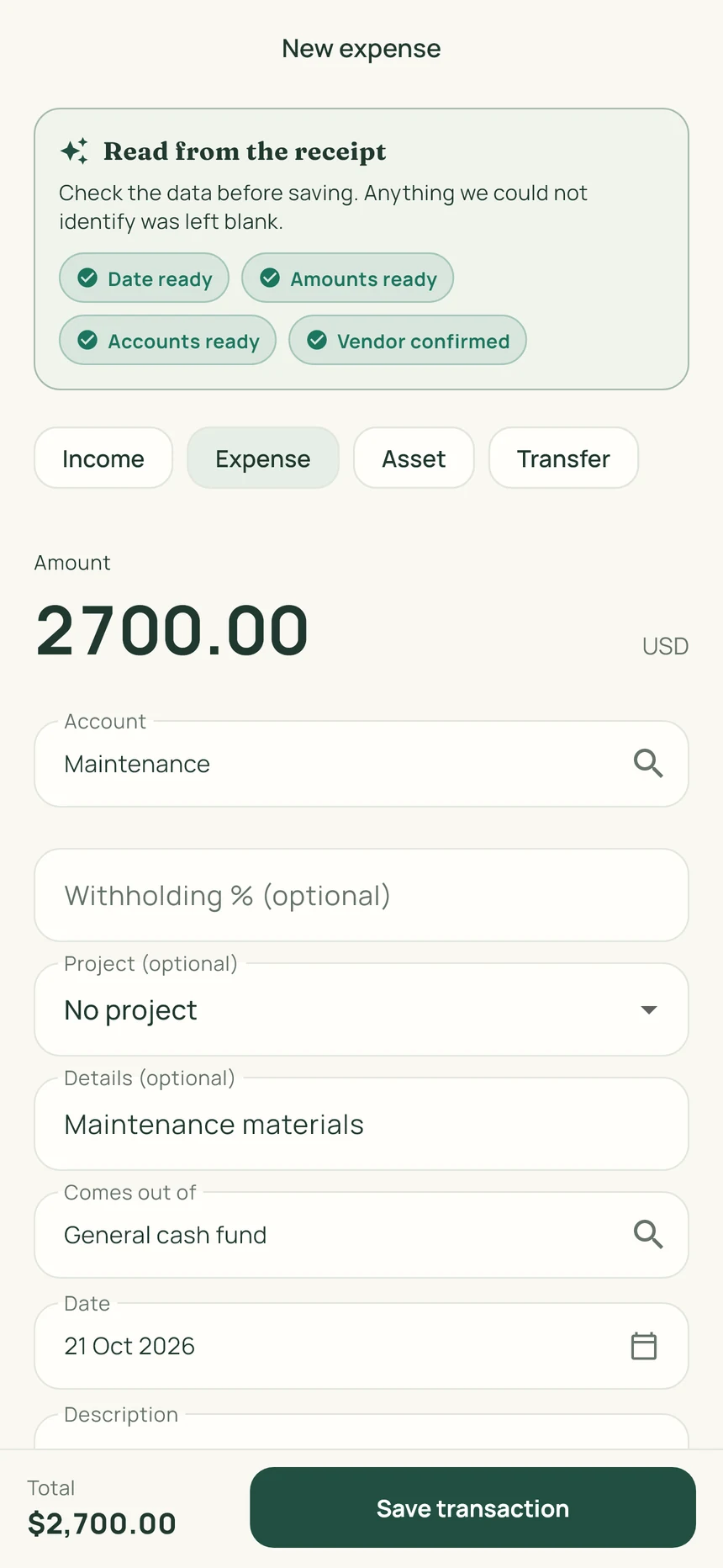
Record income or an expense in the right account. Add a description and supporting photos so the person reviewing it can understand the amount. The receipt scanner suggests details for you to check before saving.

  • Keep the receipt or invoice with the entry.
  • Correct the date, amount or category when needed.
  • Distinguish transfers from new income and expenses.
A report you can actually open and examine

The completed sample shows the summary and 24 transactions. Your church can select a period, prepare its report and review the entries behind the totals. The sample uses fictional records, rather than customer accounts.

  • Opening balance, income, expenses and closing balance.
  • Transaction dates, descriptions and amounts.
  • An individual account and permissions for each team member.
Receipt scanner

From receipt to record, without retyping each detail.

ContaIglesia suggests the receipt date, items and amounts. Review what it read, correct anything needed and save the photo with the transaction.

  1. 01

    Photograph the receipt

    Materials, a utility bill or a church purchase.

  2. 02

    Review the details

    Check the date and amount. Correct or complete anything needed.

  3. 03

    Keep the supporting photos

    Save up to three photos with the transaction: the receipt, invoice or an image of the purchase.

Real ContaIglesia screen in English: review of a USD 2,700 maintenance expense, with account, date and save buttonView the full image
Receipt review in English · USD demonstration

On the go, your phone. At the office, your computer.

Start your trial on the web. Then sign in on iPhone or Android with the same account.

ContaIglesia

Try it with your church’s accounts.

Record a transaction, attach its receipt and prepare a report. Decide after using the product.

Included

  • Up to 5 sets of books under one administration
  • 1,200 monthly credits for receipt scanning
  • Monthly view, transactions and balances
  • Separate reports per area
14 days free

No card. No charge at signup.

Then, if you decide to continue
USD 9per month
USD 90per year · save 2 months

Base prices in USD. Stripe may offer payment in your local currency; you will see the currency and final amount before confirming. App store prices may vary.

See the full plan

Before you start

Can we try it without a card?

Yes. The trial lasts 14 days and requires no payment card. Record a manageable part of your church’s activity, review the report and decide whether to subscribe.

Can the treasurer use a computer and a phone?

Yes. The same account works on the web, iPhone and Android. Start the trial here, then sign in on the device that suits the task.

Does the sample report certify tax compliance?

No. It demonstrates how the church’s records can be presented. Tax requirements and acceptable supporting documents depend on your church’s situation and jurisdiction; review them with its accounting professional.

Do I have to pay to try it?

No. The trial lasts 14 days and requires no card. At the end, you decide whether to subscribe.

Can I use it for a project or ministry?

You can separate the accounts for a building project, ministry or campus and organize its transactions and receipts.

Can we use a phone and a computer?

Yes. The same account works on the web, iPhone and Android. Start your trial here, then sign in to the app.

Does it replace an accountant?

No. It organizes records and reports for your board and accounting professional to review.

Need help getting started?

Talk to support